


TL;DR
- A 90-day ERP implementation is achievable for SMBs and mid-sized UK businesses implementing core modules, but only with strong preparation in the weeks before the clock starts.
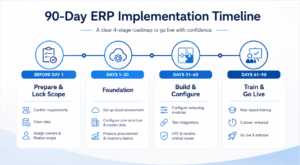
- The 90 days breaks into three clear phases: Days 1 to 30 (foundation), Days 31 to 60 (build and configure), Days 61 to 90 (test, train, and go live).
- The work that determines whether you make 90 days happens before day one: data cleaning, requirements sign-off, and internal team alignment.
- The three things that blow timelines most often are dirty data that takes longer to clean than expected, scope additions mid-project that nobody budgets for, and user training that is left too late.
- Cloud ERP is significantly more achievable in 90 days than on-premise. No server provisioning, no infrastructure setup, no waiting for hardware.
- Blue Lotus 360 delivers structured 90-day implementations for UK SMBs through its Express onboarding programme, with a dedicated project lead and fixed implementation scope from day one.
Ninety days sounds optimistic until you understand what determines whether an ERP implementation takes three months or three years. It is not the complexity of the software. It is the quality of the preparation, the discipline of the scope, and the clarity of the decision-making on both sides.
Businesses that spend six months going live on ERP are usually not doing six months of productive implementation work. They are doing three months of productive work interrupted by scope debates, data quality discoveries that nobody anticipated, and internal stakeholders who were not properly briefed until the project was already underway.
This guide gives you a realistic, structured approach to a 90-day ERP implementation for UK SMBs and mid-sized businesses implementing core modules. It is not a template you paste into a project tool and call it a plan. It is a breakdown of what actually needs to happen in each phase, what typically goes wrong, and how to stay on track when the unexpected arrives.
Is 90 Days Realistic for Your Implementation?
Before you commit to a 90-day timeline, be honest about whether it fits your situation.
A 90-day implementation works well when: you are implementing a focused set of core modules (finance, inventory, procurement, HR, and sales rather than all of them simultaneously); your business has a single site or a small number of locations with consistent processes; your data is in reasonable shape or you have time to clean it before the project starts; your internal team includes a dedicated project owner who can give the project meaningful time, not just attend weekly calls; and you are using cloud ERP, which removes the infrastructure and server setup that adds weeks to on-premise projects.
A 90-day timeline is harder to defend when: you have complex manufacturing processes requiring significant configuration; you need multiple bespoke integrations built from scratch; you are operating across many sites with different workflows; your data is in a genuinely poor state with years of inconsistent entries; or your business goes through a high-volume trading period in those 90 days (a retailer going live in November, for example, is asking for trouble).
If your situation falls into the harder category, the answer is not to abandon the target but to scope the 90-day phase more tightly. Finance and HR in 90 days, manufacturing in the next phase. That is a legitimate and often sensible approach.
The Work That Happens Before Day One
The 90-day clock does not start when you sign the contract. It starts when your implementation is genuinely ready to begin. The preparation work that happens before that point is what separates implementations that run to 90 days from those that run to 180.
Requirements sign-off. Before your implementation partner writes a single line of configuration, your internal stakeholders need to have agreed on what the system needs to do. Every department that touches the ERP needs to have reviewed the requirements, raised their concerns, and signed off. This is not a box-ticking exercise. It is the point at which you find out that the finance director has assumptions about the chart of accounts structure that differ from what the operations manager needs, and you resolve that disagreement before it surfaces as a mid-project crisis.
Data audit and first-pass cleaning. Pull your data out of whatever system you are currently using and look at it properly. Your customer list, your supplier list, your product catalogue, your opening stock quantities, your chart of accounts. How many duplicates are there? How many missing fields? How many product codes that do not follow any consistent convention? Start cleaning before the project starts. The amount of time this takes consistently surprises people, and it is the single most common cause of timeline slip.
Internal team assembly. Identify your project manager, your department champions (one per key area: finance, operations, HR, sales), and your executive sponsor. Make sure each person knows their role, understands the time commitment, and has their manager’s agreement to prioritise project work during the 90-day period. An ERP implementation where department champions are expected to fit project responsibilities around their full existing workload will run late.
Vendor kick-off and scope lock. Your implementation partner needs a signed-off scope document before day one. What modules are in phase one? What integrations are required? What is the go-live date? What are the acceptance criteria for go-live sign-off? Lock these in writing before the project starts. Scope changes during a 90-day implementation are not a minor inconvenience. They are timeline-killers.
Days 1 to 30: Foundation
The first 30 days are about getting the environment set up and all the building blocks in place so that configuration can begin in week five without waiting for prerequisites.
Week 1 to 2: Environment Setup and Project Launch
Your implementation partner provisions your cloud environment. You get access to both your production environment and your sandbox. Admin accounts are created. Your project manager and the partner’s project lead hold a formal kick-off meeting that covers: confirmed scope, agreed timeline with milestones, escalation paths, communication cadence, and a decision log where all configuration choices will be recorded.
Do not underestimate the value of the decision log. An ERP implementation involves hundreds of small decisions: how should the chart of accounts be structured, what approval thresholds apply to purchase orders, how should the payroll calendar be configured, what is the stock costing method. If these decisions are made verbally and not recorded, they get revisited repeatedly. A running decision log keeps the project moving.
Your system administrator accounts should be set up with two-factor authentication from day one. If you are using single sign-on with Microsoft Entra ID or Google Workspace, get that configured in week one. It sounds like a small thing. It causes unnecessary delays if left until later.
Week 2 to 3: Company Structure and Master Data Preparation
Configure your company structure: legal entity details, financial year, chart of accounts, and tax configuration. For UK businesses this means VAT setup (with MTD-compatible submission confirmed), PAYE configuration for payroll, and any applicable tax codes for your sector.
In parallel, your data team should be executing the data migration plan. Clean and format your customer master data, supplier master data, and product catalogue. Confirm your opening financial balances with your finance team and external accountant. Stock quantities should be physically counted or confirmed against the most recent reliable count.
This is the hardest part of the first 30 days. Data cleaning is unglamorous, time-consuming, and reveals problems that are uncomfortable to look at. Do it anyway. Every day spent cleaning data before import is two days saved in post-go-live reconciliation.
Week 3 to 4: Module Configuration Begins
With your company structure confirmed and master data in progress, configuration of your priority modules can begin. Finance and accounting first: approval workflows, payment terms, bank account setup, and financial reporting structure. Then procurement configuration: purchase order thresholds, approval chains, supplier payment terms. Then inventory: locations, costing method, reorder parameters.
Each configuration decision should be made with the relevant department champion present or consulted. Do not make configuration decisions in isolation and then present them to the business as completed. You will spend the next phase redoing them.
By the end of day 30, your target is: company structure fully configured, master data imported into your sandbox environment and validated, core finance and procurement modules configured and ready for testing.
Days 31 to 60: Build and Configure
The second 30 days are the most productive and the most complex. This is where the system takes shape and where the project is most vulnerable to scope creep and decision delays.
Week 5 to 6: Sales, HR, and Remaining Module Configuration
Sales module configuration covers your customer pricing structures, quotation workflows, credit limit settings, and order-to-invoice process. If your business has tiered pricing, volume discounts, or customer-specific price lists, these need to be configured and tested against real customer scenarios, not just the most straightforward case.
HR and payroll configuration requires careful attention to UK compliance specifics. PAYE and NIC calculations, RTI submission setup, workplace pension auto-enrolment, leave entitlements, and statutory pay calculations. Run a test payroll cycle in your sandbox environment in week six and verify the output against your current payroll data. Do not wait until week eleven to discover that something is configured incorrectly.
If you have manufacturing modules in scope, work through your bill of materials, production order workflow, and material requirements planning parameters this week. Manufacturing configuration has the most interdependencies with other modules and needs the most testing time.
Week 6 to 7: Integration Build and Testing
Integrations with external systems need to be built, tested, and validated in the sandbox environment before they go anywhere near production. Prioritise them in order of business criticality.
Your bank feed or payment file export is typically the highest priority: your finance team cannot function without it. Your e-commerce integration comes next if you sell online. Third-party payroll bureau connections, shipping carrier integrations, and sector-specific tool connections follow.
For each integration, agree the data flow direction, the trigger mechanism (real-time, scheduled, or manual), and what happens when the integration fails. Every integration should have an owner who monitors it and knows how to escalate if something breaks.
Week 7 to 8: User Acceptance Testing
User acceptance testing (UAT) is where your actual users, not your implementation team, test the system against real business scenarios. This is the point at which the gap between how the system has been configured and how the business actually operates becomes visible.
Give each department a set of test scripts covering their typical daily and monthly tasks. Your finance manager tests the end-to-end purchase invoice process, the bank reconciliation, and the month-end close workflow. Your warehouse team tests goods receipt, stock allocation, and dispatch confirmation. Your HR team tests a payroll run, a new starter onboarding, and a leaver process.
Every issue found in UAT should be logged with a severity rating: critical (blocks go-live), significant (must be resolved but can follow go-live with a workaround), and minor (can be addressed post-go-live). Critical issues must be resolved before the system goes live. Negotiating which issues are truly critical versus which are genuinely manageable with a workaround is a conversation your project manager needs to have with each department head.
By the end of day 60, your target is: all modules configured, integrations tested in sandbox, UAT completed and signed off, all critical issues resolved.
Days 61 to 90: Test, Train, and Go Live
The final 30 days are about making sure your team is ready to use the system confidently, running your final data migration, and executing the cutover cleanly.
Week 9 to 10: Training Delivery
Training is consistently underinvested in ERP projects, and the cost of that underinvestment shows up as slow adoption, shadow spreadsheets, and a helpdesk queue that overwhelms your implementation partner in the first month.
Role-specific training is more effective than generic system walkthroughs. Your finance team does not need to understand how the warehouse module works. They need to know how to process a supplier invoice, reconcile the bank, raise a credit note, run a debtor ageing report, and close a period. Build training sessions around the tasks each role will actually perform, using real data from your sandbox environment.
Management training deserves its own session. Your project manager, finance director, and MD need to know how to read the dashboards, how to run the reports they will actually use, and how to approve workflows that route to them. If leadership cannot extract value from the system, the cultural message to the team is that the ERP is an admin burden rather than a business tool.
Identify your internal champions during training: the people in each department who pick the system up quickly and naturally become the first point of contact for their colleagues’ questions. Investing additional time in these individuals during the training phase pays dividends for months after go-live.
Week 10 to 11: Go-Live Preparation and Dress Rehearsal
Run a full dress rehearsal of your cutover plan using your sandbox environment. Migrate your data from scratch. Validate the results. Test your integrations. Time the process. Note every problem you encounter and resolve it before the real cutover.
Your cutover checklist should cover: production environment fully configured and matching the tested sandbox; all master data loaded and verified against source records; opening financial balances confirmed and signed off by your finance director; all integrations tested end-to-end in production; user accounts active with correct role assignments; and a go or no-go decision by your project manager, implementation partner lead, and executive sponsor together.
Choose your go-live date thoughtfully. Not at month-end. Not during a high-volume trading period. Not during a period of key staff holidays. A quiet operational week in the middle of the month gives your team the space to adjust without the pressure of a peak period bearing down on them.
Week 11 to 13: Go Live and Stabilise
Go-live week should feel less dramatic than it does in project plans. If your preparation has been thorough, the main task is switching on the production system, confirming that everything works as expected, and supporting your team through their first live transactions.
Your implementation partner should be on high-priority support for the first two weeks after go-live. Issues should be triaged and resolved within agreed response times. Keep a live issues log visible to everyone on the project team.
Expect a productivity dip in the first two to three weeks. This is normal and does not indicate the implementation has failed. Your team is learning new habits while doing their jobs. Support them. Do not schedule a major operational push or a board presentation requiring fresh data in the first week after go-live.
Plan your parallel running period for finance and payroll specifically. Run both the old and new systems for at least one full payroll cycle and one month-end close, comparing outputs before you fully decommission the legacy system. This is the insurance policy that most teams are glad they had.
The 90-Day ERP Implementation Timeline
Below this guide sits an interactive timeline infographic showing the full 90-day schedule across all phases, milestones, and key decision points. Use it to brief your team at project kick-off and to track progress against each phase.
What Happens After Day 90?
Go-live is not the end. It is the point at which the system starts delivering value, and also the point at which most of the goodwill built during the implementation will either be confirmed or eroded based on how the first 90 days of operation go.
In the 30 days after go-live, focus on stabilisation: resolving issues quickly, monitoring adoption, and making sure every user has what they need to do their job in the new system. In months three to six, start measuring outcomes: is month-end close faster? Is stock accuracy improving? Are debtor days reducing? Are purchase order approval cycles shorter?
These measurements are your proof of value and the foundation of your business case for phase two.
Phase two planning should begin by month three, not because you need to rush it, but because having a visible roadmap shows your team and your board that the ERP is a long-term investment rather than a one-time project. When people see that manufacturing modules or advanced warehouse management are coming in phase two, they are more motivated to make phase one work properly.
How Blue Lotus 360 Delivers 90-Day ERP Implementations
Blue Lotus 360 offers a structured 90-day implementation programme for UK SMBs through its Express onboarding model. The implementation covers Finance and Accounting, Procurement, Inventory Management, HR and Payroll (PAYE, RTI, auto-enrolment), and Sales from a single integrated cloud platform, with a dedicated project lead, a fixed scope, and a go-live guarantee built into the engagement.
The platform is cloud-native, which means no server provisioning, no infrastructure delay, and no IT overhead eating into your 90 days. MTD compliance, UK bank feeds, and GDPR-compliant data hosting are all standard. The implementation team is UK-based and has delivered this programme for businesses across manufacturing, distribution, services, retail, and construction.
Book a free consultation at bluelotus360.com/uk/ to discuss whether the 90-day programme fits your business and get an honest assessment of what preparation you need to complete before the clock starts.
Frequently Asked Questions
Is a 90-day ERP implementation realistic for a UK SMB?
Yes, for businesses implementing a focused set of core modules on a cloud ERP platform. Finance, procurement, inventory, HR, and sales can all be implemented in 90 days with proper preparation, a clear scope, and an engaged internal team. The timeline becomes harder to achieve when scope is too broad, data is in poor condition, or key stakeholders are not available consistently during the project period.
What is the biggest risk to a 90-day ERP implementation timeline?
Data migration is the most consistent cause of timeline slip. Businesses consistently underestimate how much cleaning and reformatting their legacy data needs before it can be imported into a new system. Starting the data audit and cleaning process before day one of the implementation is the single most effective thing you can do to protect your timeline.
Do we need a dedicated internal project manager for a 90-day implementation?
Yes. An ERP implementation, even a focused 90-day one, requires someone internally who has the authority to make decisions, the time to attend project meetings and review progress, and the relationships to coordinate across departments. A project manager who is fitting implementation responsibilities around a full existing workload is a reliable predictor of a delayed go-live.
How does cloud ERP make 90-day implementation more achievable?
Cloud ERP removes the infrastructure setup that adds weeks to on-premise implementations. There is no server procurement, no operating system configuration, no database installation, and no network configuration before the software can even be accessed. Your implementation partner provisions your environment in hours, not weeks, and the 90 days are spent configuring and testing the system rather than building the infrastructure it sits on.
What should we do if we miss the 90-day target?
First, understand why the timeline slipped. If it is a data quality issue, prioritise data resolution and set a new go-live date with a realistic buffer. If it is scope creep, formally assess each addition against the go-live criteria and decide what can be deferred to phase two. If it is resource availability, have an honest conversation with your executive sponsor about whether the right people are committed to the project. A delayed go-live is recoverable. A go-live that happens on time but with unresolved critical issues is significantly harder to recover from.